FORGOT YOUR DETAILS?

Backorder Manager for WooCommerce:
Control Backorders Globally or by Category

Backorder Manager gives you a cleaner way to control backorders across your WooCommerce store from one settings screen.

Set a storewide backorder policy, apply rules to selected categories, keep product-level exceptions in place, and keep important products visible without turning backorder management into a product-by-product task.

Get Backorder Control Without the Manual Work

WooCommerce includes native backorder settings, but managing them across a growing catalog can get tedious fast. What starts as a simple stock setting can turn into repeated product edits, inconsistent category behavior, and extra admin work every time your inventory policy changes.

Backorder Manager is built for stores that want more control without more clutter. Instead of opening products one by one, you can manage broader backorder behavior from one place and keep your catalog easier to maintain.

That is especially useful when you want to:


  • enable backorders across most or all products
  • apply different rules to specific categories
  • let certain products stay outside the broader rule
  • keep eligible zero-stock products visible
  • deal with conflicts caused by other stock or inventory plugins
Backorder Manager for WooCommerce allows you to control backorders globally

What Backorder Manager Lets You Control

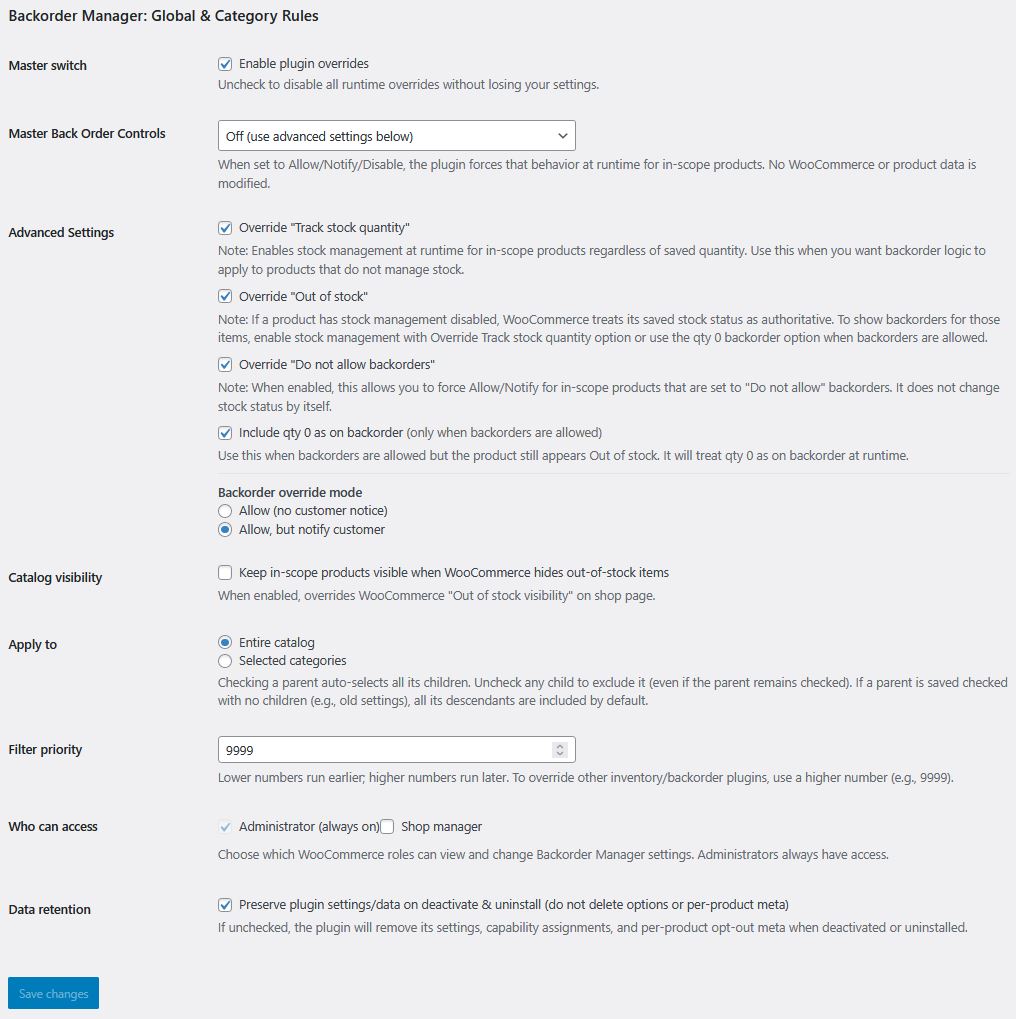
Set a global backorder mode

Choose the backorder behavior you want for products in scope:

  • Allow
  • Allow but notify
  • Disable

This gives you a simple way to apply one clear policy across the store when most of your catalog should follow the same rule.

Apply rules to the full catalog or selected categories

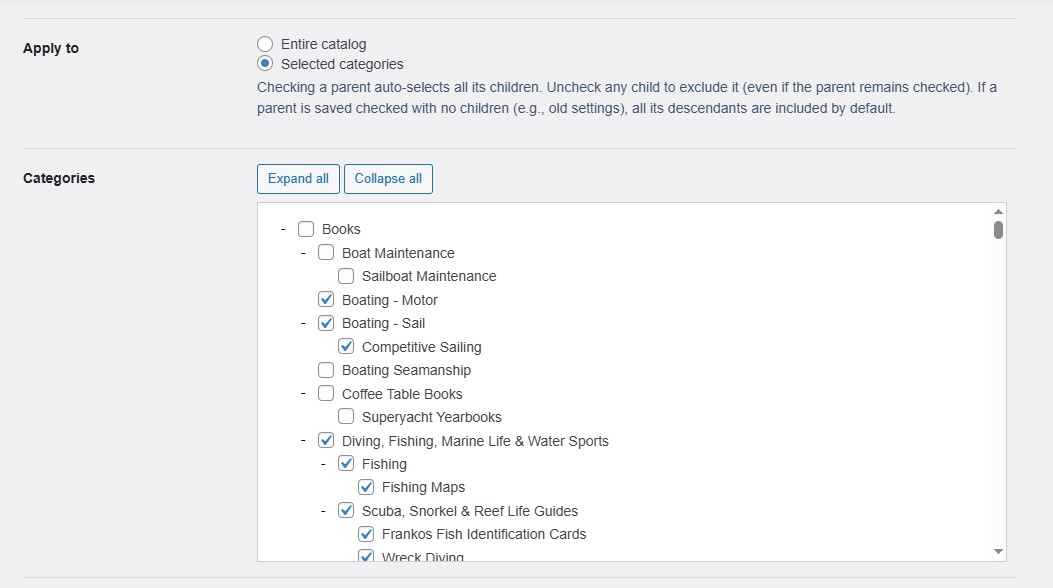
Not every store needs one rule for everything. Backorder Manager can apply rules across the full catalog or only to selected product categories.

That makes it a better fit for stores with mixed inventory workflows, such as preorder categories, made-to-order product lines, or collections that should follow different stock behavior than the rest of the store.

Keep product-level exceptions

Even when a broader rule makes sense, there are still times when one product should behave differently.

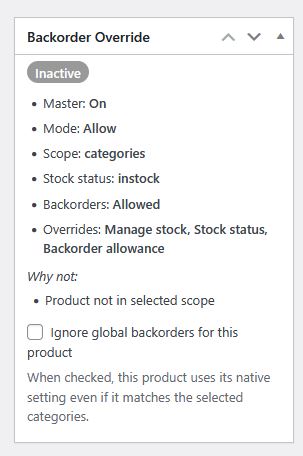
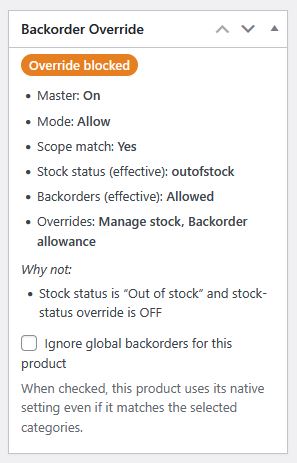
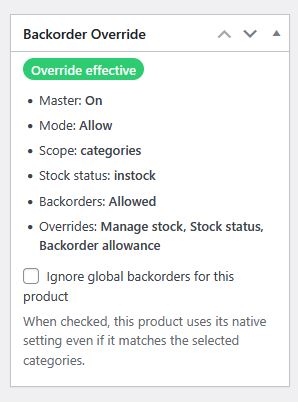
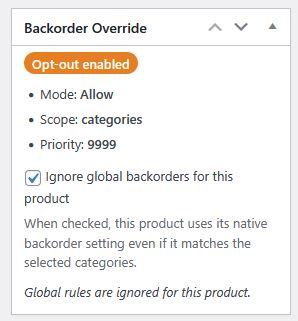
Backorder Manager includes a product-level opt-out so individual products can stay outside the broader rule when needed. That gives you the benefit of centralized control without forcing every product into the exact same stock behavior.

Keep native product data intact

One of this Backorder Manager's strongest advantages is that it works at runtime only. That means it does not rewrite your stored product backorder data in the database.

Your WooCommerce product settings remain native and editable.

Keep eligible products visible

If your store hides out-of-stock products, that can create a frustrating problem for products you still want customers to order on backorder.

Backorder Manager can keep eligible products visible so they remain part of the browsing experience instead of disappearing from shop and category pages the moment stock reaches zero.

Reduce plugin conflicts

If another inventory-related plugin is affecting stock behavior, Backorder Manager includes filter priority control so you have a better way to manage conflicts and keep the intended rule in effect.

Restrict settings access by role

Control who can change Backorder Manager settings inside WooCommerce. This helps limit access to the users who should manage inventory behavior, while keeping administration simpler and more secure.

Works with Woo Blocks and Product Collection

Built to work with modern WooCommerce storefront behavior, including Woo Blocks and Product Collection. That helps your backorder rules apply more consistently across newer shop and archive layouts.

Plugin Settings Screen

Main settings screen for Backorder Manager for WooCommerce which allows you to control backorders globally

Category Exceptions

Backorder global manager category exclusion settings

Individual Product Exceptions

Individual product override settings panel for Backorder Manager for global backorder edits in WooCommerce

Why Stores Use Backorder Manager

Backorder Manager is a strong fit for WooCommerce stores that have outgrown simple product-by-product backorder management.

It is especially useful for stores that want:

  • one backorder rule for most of the catalog
  • category-based inventory control
  • exceptions for specific products
  • zero-stock backorderable products to remain visible
  • less repetitive admin work
  • a cleaner way to manage stock behavior over time

For small catalogs, manual edits may be manageable for a while. For larger or growing stores, they usually become a drag on day-to-day operations.

Backorder Manager gives you a more practical way to manage that same logic without rebuilding the same setup over and over.

How Backorder Manager Works in WooCommerce

Backorder Manager is designed to keep the setup straightforward.

You choose the backorder mode, choose the scope, refine category behavior if needed, and then leave product-level exceptions available for cases that should stay outside the broader rule.

That gives you a structure that works well for real stores:

  • broad control where you need consistency
  • category targeting where you need flexibility
  • product opt-out where you need exceptions
  • visibility control where you need storefront support

The result is a cleaner backorder workflow that makes more sense as your store grows.

Built for Real WooCommerce Stores

Some stores want a simple storewide rule. Others need category-based control. Others need both, plus a way to keep individual products outside the broader policy.

Backorder Manager is built for that middle ground between “everything manual” and “everything forced into one rule.”

It gives you a cleaner way to manage backorders when your store has real-world complexity, but you still want the workflow to stay manageable.

Frequently Asked Questions

No. Backorder Manager applies its rules without turning your catalog into a mass-edit project, so your WooCommerce product setup stays easier to manage.

Yes. You can apply rules across the whole catalog or narrow them to selected categories.

Yes. The plugin includes a per-product opt-out checkbox on the product edit screen. Individual products can stay outside the broader backorder rule when needed.

Yes. Backorder Manager can help keep eligible backorderable products visible instead of letting them disappear from the storefront.

Backorder Manager includes filter priority control to help when another stock or inventory plugin is interfering with the expected behavior.

Yes. The plugin is built to work cleanly within the WooCommerce admin and storefront workflow, including current product collection behavior.

Get Backorder Control Without the Manual Work

If your store needs a cleaner way to manage WooCommerce backorders, Backorder Manager gives you one place to do it. You can set a global rule, limit it to selected categories, preserve product-level exceptions, keep eligible products visible, and avoid rewriting native product data in the process.

For WooCommerce merchants trying to solve backorders at scale, that is the real value: less product-by-product maintenance, more consistency, and more control.

TOP